


Test your IP address
This is what the websites you visit can see about you right now. Connect to Le VPN to hide your IP address and change your virtual location in one click.
Initializing secure probe…
0%
// network
- IP address
- Location
- Provider (ISP)
- Connection
// device fingerprint
- Browser
- Operating system
- Device
- Screen
- Timezone
- Language
// webrtc leak test
- Local IP exposure
- testing…
Take back your privacy in one click
Le VPN hides your IP, encrypts your connection and lets you appear anywhere in the world - across all your devices.
Hide My IP Address30-day money-back guarantee • No logs • Works on all devices
Connect to Le VPN and change your IP to one of the following countries
Pick any location below and get a fresh local IP address in one click. Your real IP and geolocation stay hidden the whole time.
Every location runs the full protocol stack
- Stealth WireGuard
- WireGuard
- OpenVPN 443 TCP · 53 UDP · 80 TCP
- IKEv2
- IPSec
- L2TP
- PPTP
Europe
46 locations-
 Austria Graz · Vienna
 -
 Belgium
 -
 Bulgaria
 -
 Croatia
 -
 Cyprus
 -
 Czech Republic
 -
 Denmark
 -
 Estonia
 -
 Finland
 -
 France Paris · Lille · Marseille
 -
 Germany
 -
 Greece
 -
 Hungary
 -
 Iceland
 -
 Ireland
 -
 Isle of Man
 -
 Italy
Italy -
 Latvia
 -
 Lithuania
 -
 Luxembourg
 -
 Malta
Malta -
 Moldova
 -
 Netherlands
 -
 North Macedonia
 -
 Norway
 -
 Poland
 -
 Portugal
 -
 Romania
 -
 Russia Moscow · St. Petersburg
 -
 Serbia
 -
 Slovenia
 -
 Spain
Spain -
 Sweden
 -
 Switzerland
 -
 Ukraine
 -
 United Kingdom London · Coventry · Kent
North America
12 locationsCentral America
6 locationsAfrica & Middle East
11 locationsAsia & Oceania
18 locationsHow do I change or hide my IP address?
There's no way to manually change your IP address on your computer, phone or tablet - this number is required by every website and server to identify you. But you can change it virtually. Installing a VPN client routes your traffic through a secure server, so the websites you connect to see the server's IP and location instead of your own. A VPN also gives you an anonymous, encrypted tunnel for everything you do online, and you're free to switch to another location at any time, creating a new virtual IP.
What if I want to unhide my IP address?
Whenever you want your device to show its real, unhidden IP address again, just disconnect Le VPN. There's no reconfiguration to do and no need to restart - your device instantly reverts to a standard IP. Many of our customers prefer to leave the VPN active all the time, keeping permanent access to the content they want and a secure tunnel for their data. There's no limit on time or data, so you can enjoy as much private, secure Internet as you like.

Download the latest Le VPN app for all devices


Download Le VPN for Mac (App Store)
For Apple Silicon and Intel Macs. Learn more about our Le VPN for Mac


Download Le VPN for Linux ( .deb)
For Ubuntu, Debian and Mint. Learn more about our Le VPN for Linux


Also available on routers:

ASUS
WireGuard · OpenVPN

GL.iNet
WireGuard · OpenVPN

TP-Link
WireGuard · OpenVPN

FRITZ!Box
WireGuard

Freebox
WireGuard · OpenVPN

Keenetic
WireGuard · OpenVPN

MikroTik
WireGuard · OpenVPN

UniFi
WireGuard · OpenVPN

Synology
OpenVPN

OpenWrt
WireGuard · OpenVPN

DD-WRT
WireGuard · OpenVPN

pfSense
WireGuard · OpenVPN

OPNsense
WireGuard · OpenVPN
Quick recap
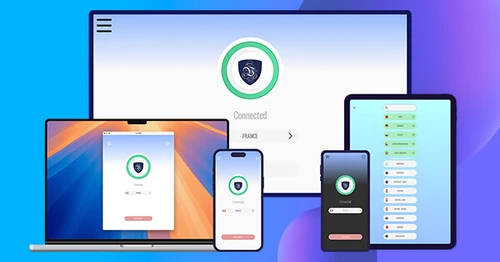
This page runs a live IP address test - it shows the IP, location and Internet provider that websites can see about you right now, plus a browser device fingerprint and a real WebRTC leak check. You can't manually change your IP, but connecting to Le VPN routes your traffic through a secure server so sites see the server's IP and location instead of yours, all inside an encrypted tunnel.
- See your real IP address, location and ISP exactly as websites detect them
- Includes a device fingerprint (browser, OS, screen, timezone) and a WebRTC leak test
- Connect to Le VPN to hide your IP and get a virtual IP from another country in one click
- Disconnect anytime to instantly revert to your real IP - no reconfiguration needed
- No limits on time or data, with an encrypted tunnel for everything you do online
- 100+ server locations, up to 10 devices on one account, 30-day money-back guarantee

