
What Is Varenyky Virus And How To Remove It?
Varenyky is a trojan horse that operates as a spambot - malicious software that turns an infected computer into a machine for sending spam. What made it infamous, though, is its spyware side: once installed, it could record the victim's screen when they visited an adult (pornography) website or searched for keywords related to adult content, then use that recording as leverage for blackmail.

First documented by security researchers at ESET, the campaign primarily targeted people in France - especially customers of the French ISP Orange - but researchers noted the malware could just as easily be aimed at users of other providers or in other countries. Even though the original Varenyky campaign has faded, it remains a textbook example of how sextortion malware works, and the same playbook is still used by newer threats today. Understanding it will help you recognize - and remove - anything similar.
How Varenyky Infects a Computer
Cybercriminals distributed Varenyky via spam campaigns: emails with malicious files attached, disguised as invoices or official documents. A typical attachment was named something like 53949248_facture-1.doc ("facture" is French for invoice). Opening the document showed a fake "protected document" notice in French:
Document Protégé
Ce document est protégé par Microsoft Word et nécessite une vérification humaine.
Veuillez suivre les étapes suivantes.
1. Naviguez vers le message « Mode protégé » et cliquez sur « Activer la modification ».
2. Une fois cette étape faite, cliquez ensuite sur « Activer le contenu » pour lire ce document confidentiel. Si vous ne voyez pas ce message, cliquez sur « Activer les macros ».
The email and document look legitimate, and victims believe they are opening a Microsoft-protected file. In reality, clicking "Enable content" runs a malicious macro that downloads and installs the trojan. This macro trick is one of the oldest and still most effective malware delivery methods - which is why modern versions of Microsoft Office block macros from internet files by default. Never re-enable them for a document you weren't expecting.
Test result on virustotal.com on Varenyky

Varenyky threat summary

The Sextortion Angle
Once installed, Varenyky monitored the victim's browser for adult-content keywords and could record the screen during those sessions. The operators then sent threatening "sextortion" emails demanding payment in Bitcoin, claiming they would send the recording to the victim's contacts unless paid.
An English version of the threat email can be found below:
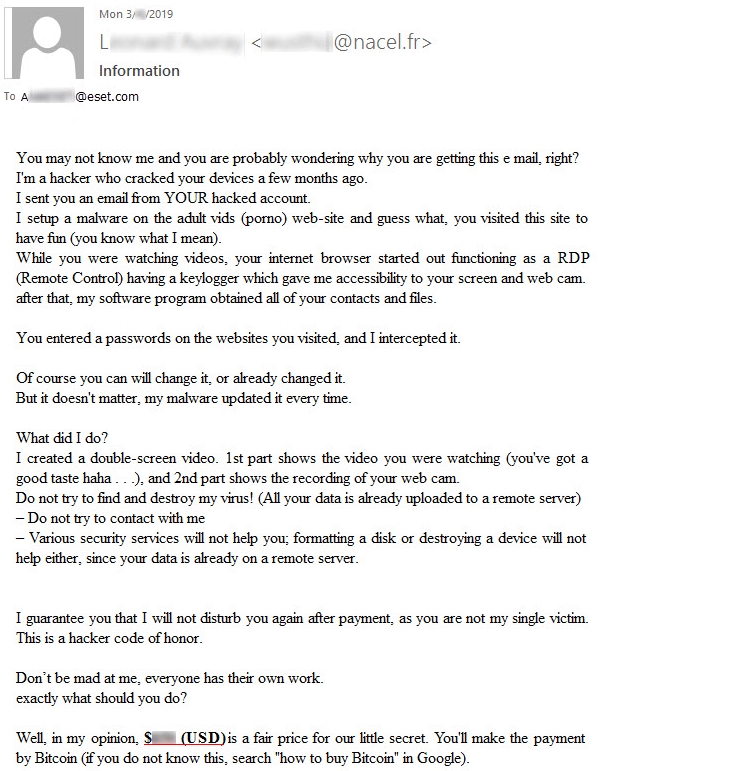
Important context: the vast majority of sextortion emails in circulation are pure bluff - mass-mailed scams from senders who have no recording and no access to your device. Varenyky was notable precisely because it actually had screen-recording capability. Either way, the advice is the same: do not pay. Paying marks you as a responsive target and rarely ends the threats. Instead, clean the machine, change your passwords, and report the extortion attempt to your local cybercrime authority.
How to Remove Varenyky (and Similar Trojans)
Security experts agree the best defense against malware is prevention: keep your operating system and antivirus software up to date, and avoid opening email attachments or downloading files unless you are completely certain they are safe. If you have already opened a suspicious attachment, follow these steps to remove the malware:
- Disconnect from the internet to stop the spambot from sending mail or receiving commands.
- Start your computer in Safe Mode with Networking.
- Run a full scan using a reputable, up-to-date antivirus or anti-malware program.
- Remove or quarantine every threat detected, then run a second scan to confirm the system is clean.
- Restart your computer in normal mode.
- Change your passwords - email first - from a clean device, and enable two-factor authentication wherever possible.
How to Protect Yourself Going Forward
Varenyky-style attacks succeed through social engineering, so the strongest protections are habits and layers:
- Treat unexpected attachments as hostile. Invoices, delivery notices, and "protected documents" from unknown senders are the classic lures. If an email comes from an unidentified sender, simply delete it.
- Never enable macros in a document that asks you to - that request is itself the red flag.
- Keep everything updated: operating system, browser, Office suite, and antivirus.
- Cover your webcam when not in use, and be skeptical of any email claiming to have compromising footage of you.
- Use a VPN as an extra layer of privacy. A premium VPN such as Le VPN encrypts your connection so your ISP and anyone on your network cannot monitor your browsing, and hides your real IP address from the sites you visit. Le VPN offers servers in 100+ locations, up to 10 simultaneous connections, and a 30-day money-back guarantee on your first purchase.
A VPN will not remove malware that is already on your device - that is the job of your antivirus - but as a first line of defense it significantly shrinks your attack surface and keeps your online activity private. Combine encrypted connections, cautious clicking, and updated software, and threats like Varenyky have very little room to work with.

